
Creating projects
Contents
Creating a new project
A project consists of at least one version that includes models (turbines, solar panels, buildings or transmission towers) and optional reference structures, overlays and viewpoints.
A new project can be created from the projects tab.
- Click New Project
- The Create Project page is displayed
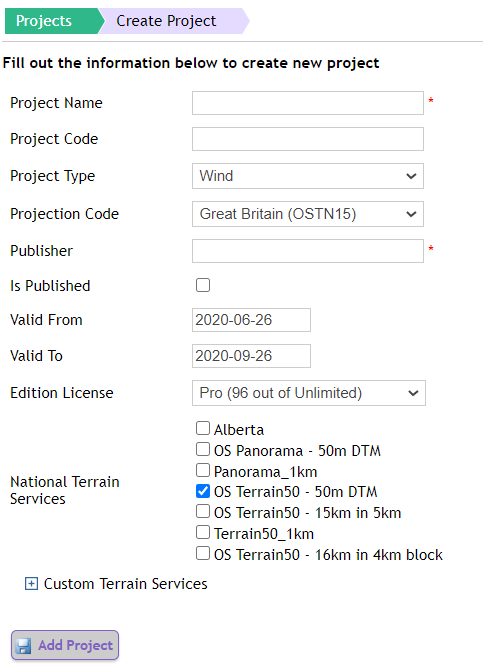
- Complete the fields required to create a new project (Show in the table below)
- Click Add Project
- A new project is created, and the Edit Project screen is displayed
| Field | xxxx | Description |
| Project Name | Complete the required name of the Project | |
| Project Code | Optionally complete the project code | |
| Project Type | This mandatory field allows you to select a type of project from the dropdown, currently supporting: Wind, Solar, Grid and Transmission. | |
| Projection Code | The projection to be used to convert WGS coordinates to projected local coordinates | |
| Publisher | Complete the required name of the publisher. This can be either a username or an organisation | |
| Is Published | This controls the project being uploaded to the device. Tick the box if the project is to be available on the iPad. Untick the box if the project is to exist on the portal only | |
| Valid From / Valid To | Control the dates the project is visible on the device for. Only projects that are valid on the date viewed will be shown on the device. This allows you to schedule projects to be published at a future date. | |
| Edition License | Choose an edition license to associate the project with – this depends on what edition license has been purchased and is associated with the organisation. | |
| National Terrain Service | Choose the terrain service or services that are available to this project. TVV provides (GB) national coverage of Panorama and Terrain 50; however, custom terrain datasets can be imported if you have an appropriate license to them. You can choose multiple terrain services for this project by checking the appropriate boxes. | |
| Custom Terrain Services | Expand the Custom Terrain Services area to add a specific terrain service if you have loaded one for this project. |
Once the project type is selected this will be the base type of your project, allowing you to organise your power-related projects along the three types presented. The remainder of the creation process remains as normal, allowing any skill set you have developed with TVV in the past to transfer seamlessly to the new project platforms.
Each type caters to the properties relevant to the project you are creating, hence creating a grid project will have information relating to the arms of the tower, whereas solar will incorporate information relating to the size and rake of the solar installation.
Projects can be deleted using the delete button on the main projects list on the homepage.
Sharing projects within a group
This feature is only available for customers on Pro Editions.
From the Edit project page, a project can be shared with other organisations in a group. To share a project:
- Click Share Project
- Choose the target organisations to share the project with
- Click Update
Shared projects will be shown within the app of the target organisation. They will not be shown in the portal.